Staff Hub
One Virtual Facility. Every Staff Role. One Connected Operation.
Every staff member operates inside the same virtual facility — each through a role-specific workspace and customizable daily workflows that open on what needs their attention right now.
Recovery Campus gives virtual treatment programs an actual facility online. Staff Hub is the staff operating environment inside that facility — the place where a treatment day comes together for therapists, group facilitators, care coordinators, and program leadership. The demo illustrates four example roles today; the role model is built to grow with your program.
Why it exists
Virtual programs run on scattered tools. Staff Hub gives the day one home.
In a physical treatment center, staff share a building. They see who walked in, who is waiting for group, which room is empty, and which colleague is free. Virtual programs lose that shared sense of place. The video link lives in one tool, the schedule in another, attendance in a spreadsheet, follow-ups in a text thread, and the clinical record in the EHR. Every staff member rebuilds the day in their head, every morning.
That fragmentation is where behavioral health program operations quietly break down: a group starts with half the roster still not checked in, an evening session has no backup facilitator, a participant who missed yesterday never gets a call. None of these are clinical failures. They are operational gaps — and they decide whether people stay engaged long enough to finish treatment.
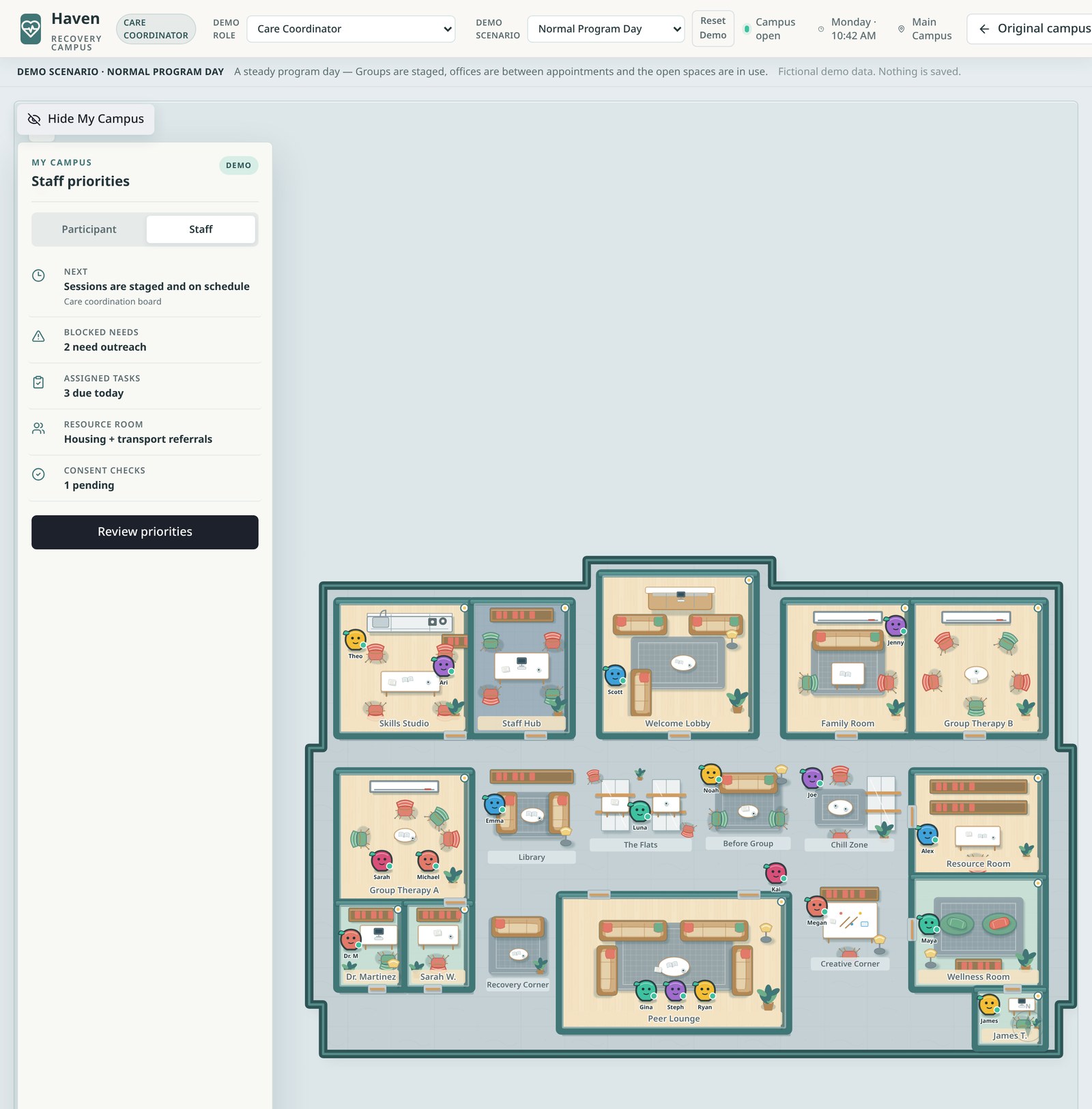
Staff Hub answers with a simple idea: one campus, role-aware daily operations. Everyone works in the same virtual facility participants attend. What changes is the lens. A therapist, a facilitator, a care coordinator, and a program manager each open Staff Hub and see the same program from the angle of their responsibility.
One campus
Staff work inside the facility, not beside it
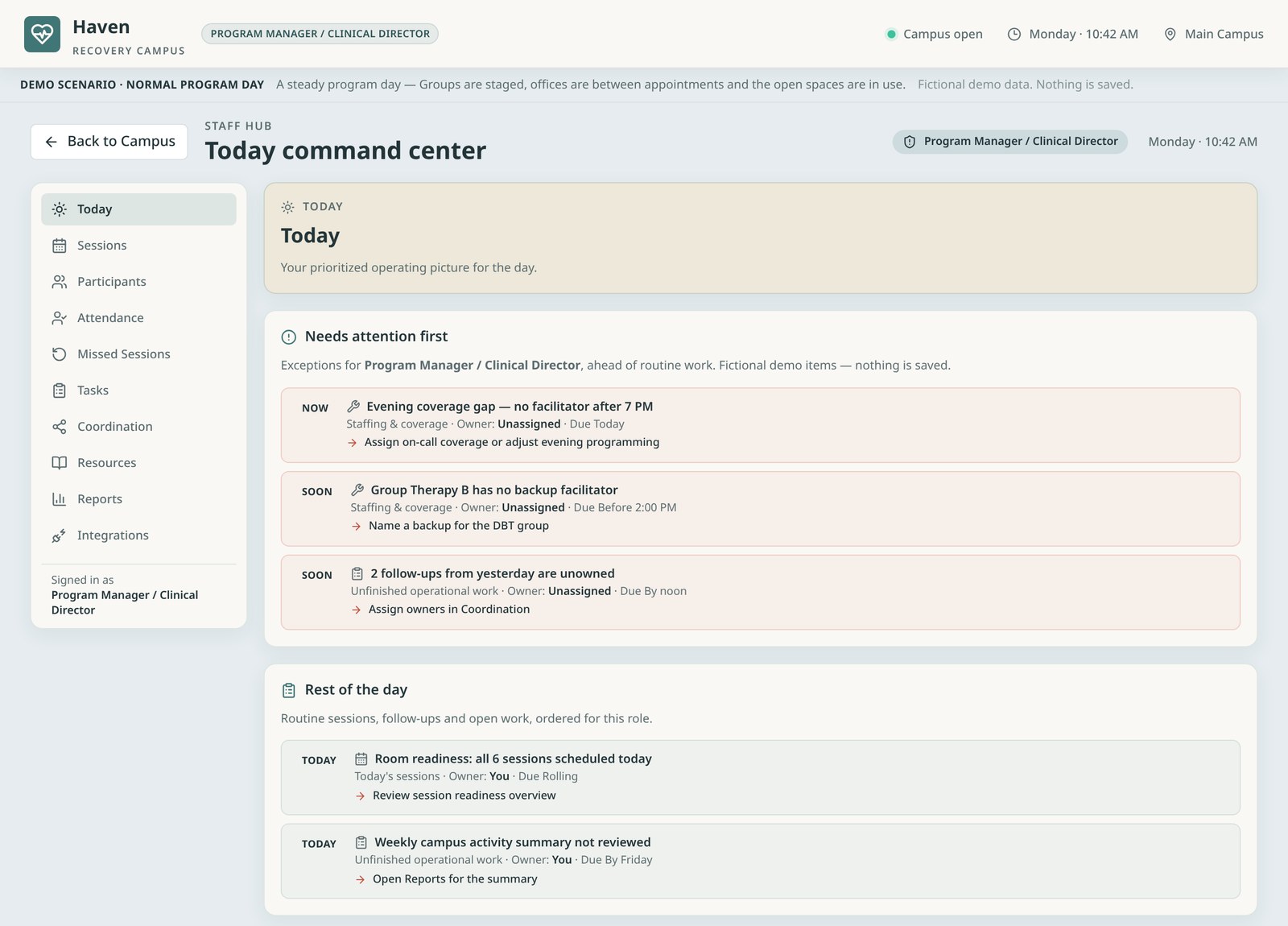
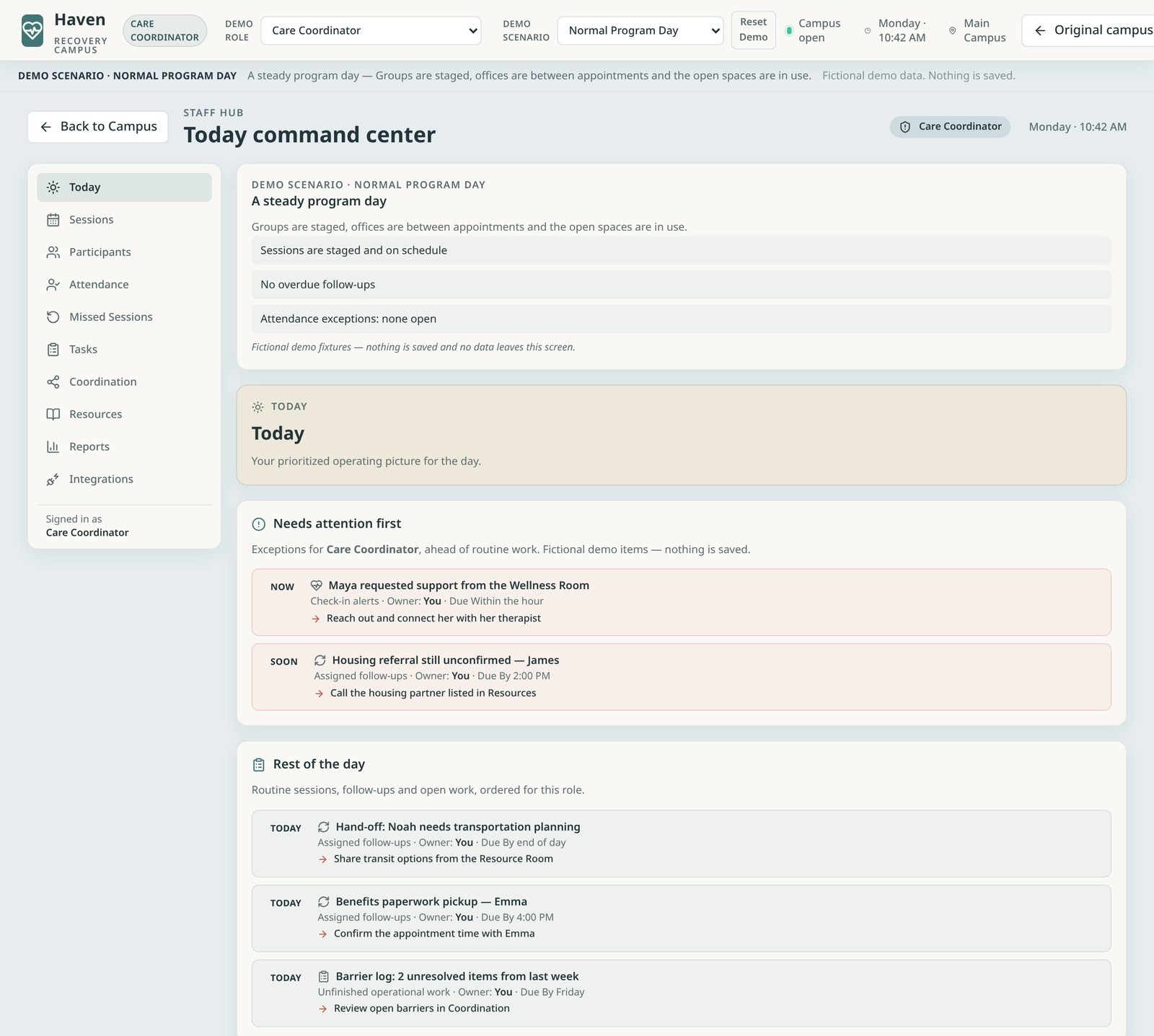
Genuine screens from the live demo campus. Fictional demo data; nothing is saved.
Interactive tour
What Staff Hub brings together
Select a capability to see how it shows up in the workspace.
Needs Attention First
Staff Hub opens on what needs attention right now — a coverage gap, a group without a backup facilitator, unowned follow-ups — ranked ahead of routine work for the signed-in role.
- Exception-based work instead of scrolling endless lists
- Every item carries an owner, a due time, and a next action
- Routine work stays visible below, ordered for the role
A day in the life
The whole treatment day, operated from one place
Staff Hub is not a scheduling screen, a notes tool, or an EHR. It spans the full experience of a program day.
- Welcome & itineraries
- Pre-group readiness
- Staff presence
- Sessions & attendance
- Between-group support
- Check-ins & outreach
- Tasks & resource help
- Completion & graduation
- Leadership oversight
A virtual program day, from first welcome to leadership oversight.
The day starts before anyone joins a call. Participants receive their itinerary and a warm welcome. As group approaches, facilitators see pre-group readiness: who has checked in, who has not, and which room is staged. Staff presence is visible on the campus, so colleagues know who is available. Sessions run, attendance is recorded, and anyone who did not arrive becomes a follow-up rather than a silent absence.
Between groups, the work is quieter but just as important — check-ins, outreach to people running late, tasks, and help finding resources. Over weeks, that same rhythm carries participants toward completing the program and graduation, while leadership watches the whole operation for exceptions and quality. Each moment has an owner and a place in Staff Hub.
Group readiness, sessions & attendance
Walk into every group already knowing who is ready
Group therapy scheduling tells you when a session happens. It does not tell you that two of eight participants have not completed their pre-session check-in, or that the backup facilitator for the evening group was never named. Staff Hub surfaces exactly that kind of signal as next-session readiness, so the facilitator can reach out before group instead of discovering the gap at the start.
Attendance tracking lives in the same workflow. Sessions, participants, attendance, and missed sessions sit side by side, and a missed session turns into a recovery action with an owner — not a row in a report someone reads next week. Post-group tasks flow straight back into the day's work list. The result is fewer surprises at the start of group and fewer people quietly falling away after it.
Staff exception management
“Here is what needs your attention right now.”
Most dashboards ask staff to scan everything and decide what matters. Staff Hub inverts that. Its priority panel puts urgent follow-ups, check-in alerts, assigned tasks, and session readiness first — each with an owner, a due time, and one concrete next action. Everything routine sits below, ordered for the role.
Exception-based work is how strong in-person programs already run: the charge nurse does not read every chart, they act on what is off. Bringing that discipline to staff workflow management in a virtual program means less time hunting for problems and more time with participants.
One workspace, every perspective
Role-aware workspaces, editable daily workflows
Four example perspectives from the current demo. Each comes with a starting daily workflow template that programs can adapt — not a rigid one-size-fits-all script. More roles can be added.
Prepare, see what matters, deliver care
The therapist's day centers on sessions. Staff Hub brings the next session's readiness forward, along with the participant alerts and follow-ups relevant to their caseload, so preparation takes minutes instead of a tour through several systems.
Clinical documentation stays in the EHR. Staff Hub handles the operating context around care: who is ready, who needs a check-in, and what was left open.
Human engagement
Patient engagement that feels like someone noticed
Participants in virtual programs rarely drop out in a single moment. They drift — a late arrival, a skipped check-in, a missed group. Staff Hub gives the care coordinator the signals to notice drift early and the workflow to respond personally. The demo Care Coordinator view shows this directly: a participant who requested support from the Wellness Room, a housing referral still unconfirmed, a transportation hand-off, and a barrier log of unresolved items.
Because it all happens inside the campus, coordinators can point participants to the right room — including the Resource Room, where participants explore curated media and practical information — and see participants' own planning in My Day.
Planned enhancement: a dedicated care coordinator dashboard with a “Curate Resource Room” action that opens content curation for videos, podcasts, articles, and other media. This is not part of the current demo and is not shown in any screenshot on this page.
Scalable workflows & room ownership
Every room has an owner. Administration keeps final authority.
- Administrator configures role templates
- Assigns room owners
- Owners curate & run their rooms
- Administrator reviews, overrides, or restores
Ownership model for campus rooms and staff workflows. Parts of this model are planned enhancements.
A facility runs well when every space has someone responsible for it. In Recovery Campus, each room has an owner role accountable for its curation and daily operation. Owners can make changes within their permissions without waiting for preapproval, so rooms stay current.
The program administrator holds final authority: configuring workflows, assigning owners, overriding changes, and restoring a previous version when needed. Role templates are program-specific and editable, which lets a solo virtual IOP and a multi-location provider each shape Staff Hub to their own model. Granular ownership, override, and version restore are part of the product direction and are described here as planned rather than shown in the current demo.
Leadership oversight
See the whole program at a glance
For owners and clinical leaders, the hardest part of running a virtual program is visibility. Staff Hub gives leadership the same facility view staff use, with exceptions rolled up: coverage, readiness, unowned work, and activity summaries in reports. Intensive outpatient program management becomes a matter of reviewing what is off today, not reconstructing what happened last month.
How it fits
Not an EHR. Not just scheduling. The place the program operates.
The EHR records treatment — notes, diagnoses, treatment plans, and the legal record. Staff Hub does not replace it; the demo labels any EHR action as a simulation. Telehealth delivers the call. Scheduling software books time. Staff Hub is behavioral health operations software for what happens around all of those: readiness, presence, outreach, attendance, follow-through, and exceptions, inside a facility participants actually attend.
For staff, that means fewer tools to stitch together and a clearer day. For participants, it means someone notices when they are missing. For leadership, it means an operation they can see. That is the efficiency Staff Hub is built for — not more data entry, but less friction across every role.
Questions programs ask
Frequently Asked Questions
What is Staff Hub in Recovery Campus?
Staff Hub is the staff operating environment inside the Recovery Campus virtual facility. Every staff member works in the same campus through a role-specific workspace that brings together sessions, participants, attendance, missed sessions, tasks, coordination, resources, reports, and integrations — opening on what needs attention right now.
Which staff roles does Staff Hub support?
The current demo illustrates four example perspectives — therapist, group facilitator, care coordinator, and program manager / clinical director. These are starting points, not a fixed list. The role model is designed to expand with program-specific roles and editable daily workflow templates.
Is Staff Hub an EHR or a scheduling tool?
Neither. The EHR remains the clinical system of record for notes, diagnoses, treatment plans, and the legal record. Generic scheduling software books time slots. Staff Hub is where the program's day is operated — readiness, presence, outreach, follow-through, and exceptions — inside the facility participants actually attend.
How does Staff Hub help intensive outpatient program management?
IOP days are dense: several groups, pre-session check-ins, attendance, between-group support, and follow-ups. Staff Hub gives each role a prioritized view of that day so group readiness, attendance tracking, and missed-session outreach happen in one connected workflow instead of across spreadsheets, inboxes, and texts.
What does a care coordinator do in Staff Hub?
In Recovery Campus the care coordinator is the participant success manager — often the first face participants meet. Their workflow centers on warm daily outreach, checking in on late or absent participants, helping people get to sessions and finish tasks, and removing barriers to graduation. It is human engagement, not traditional case management or EHR documentation.
Can programs customize staff workflows and room ownership?
Yes, as a design principle. Daily workflow templates are editable starting points per role. Each campus room has an owner responsible for its curation and daily operation, with the program administrator holding final authority to configure workflows, assign owners, override changes, and restore a previous version. Some of these controls are planned enhancements beyond the current demo.
Does Staff Hub integrate with our EHR and telehealth tools?
Recovery Campus is designed to complement existing systems. The current demo shows integrations as labeled simulations; live EHR or telehealth connections are scoped per program as implementation work.
How does Staff Hub relate to My Day and the Resource Room?
They are rooms in the same facility. Participants plan their day in My Day and explore support in the Resource Room; staff see the resulting activity and needs in Staff Hub. One campus, connected from both sides.
Continue exploring the facility: My Day — Participant Workspace and Resource Room. Open Staff Hub in the live campus
See it running
Give every staff role one connected operation.
Walk the live demo campus, switch staff roles, and open Staff Hub — or talk with us about your program.